XPortalNetworks
Select portal destination from a list of existing portals with custom networks and private portals support. No more tag pairing, and no more portal hubs!
Count reflects players who opted into telemetry in this mod's config. Thank you for sharing your data to support active development!
🌀 XPortal Networks
Comprehensive portal networks, private channels, and custom destinations for Valheim.





Portal Configuration UI
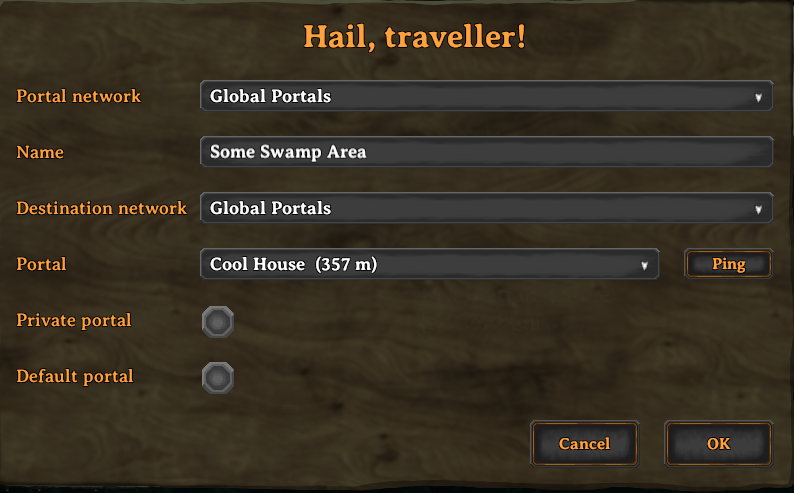
Network Selection Window
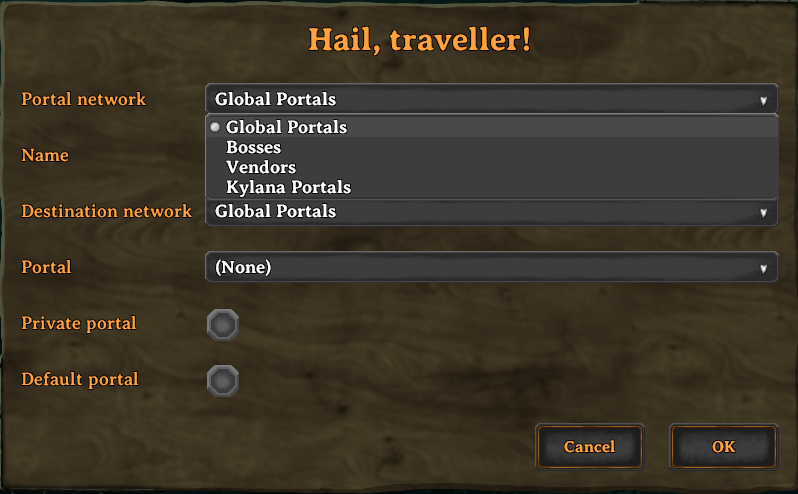
Destination Network Selection
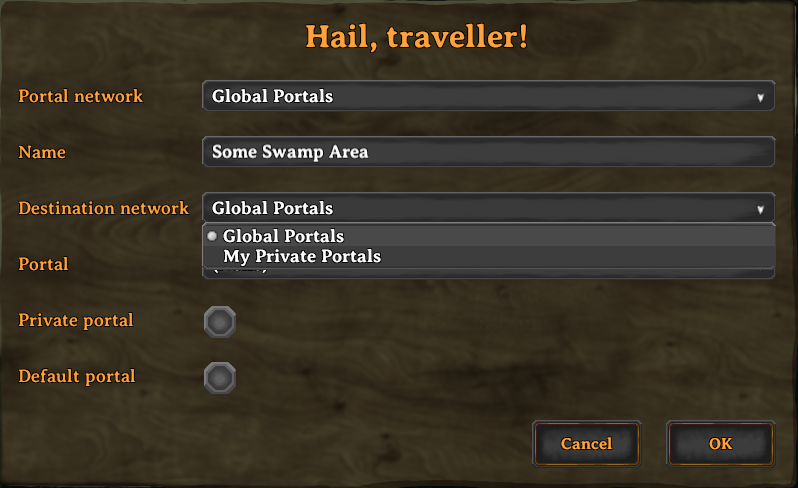

What’s New in XPortal Networks
XPortal Networks builds upon the solid foundation of the original XPortal mod by SpikeHimself, expanding it into a dedicated networking framework with extensive multiplayer features and numerous bug fixes:
- Portal Networks: Group portals into distinct networks:
- Global / Public Network: Accessible to all players on the server.
- Player Networks & Private Portals: Portals tied to individual players. Toggle the Private setting so unauthorized players cannot view or teleport through your personal portals.
- Custom Named Networks: Define up to 15 server-wide custom networks (such as Trade Hub, Clan Base, Mining Outposts, or Admin Only) via configuration, complete with real-time hot-reloading.
- Server Admin & Permission Controls: Configurable permissions allowing server admins to manage networks and prevent non-owners from deconstructing portals.
- Bug Fixes & Modernization:
- Upgraded for the latest Valheim versions and .NET Framework 4.8.
- Resolved controller UI legend and navigation issues.
- Fixed dedicated server admin destruction and permission edge-cases.
- Enhanced ZDO network synchronization and reconnection reliability.
Features
🌐 Destination Selection Menu
When interacting with a portal, a clean UI opens allowing you to select your target destination from a dropdown menu. The list displays:
- The destination portal name
- Distance to the destination (in meters)
- Portal light color indicator (when paired with mods like Advanced Portals or Stone Portal)
🔒 Public, Private & Custom Networks
Organize your world’s transportation:
- Global Network: The shared network open to everyone.
- Personal Network: Portals automatically grouped under your character.
- Private Portals: Mark sensitive portals as private so other players cannot use or retarget them.
- Custom Named Networks: Admin-defined channels defined in
xportal_networks.jsonthat organize portals by faction, region, or purpose.
⭐ Default Portal Destination
You can set a portal as your Default Portal. Newly constructed portals will immediately link to your default portal automatically, saving you time when setting up forward operating bases.
🏷️ Uncapped Portal Name Length
XPortal Networks removes the vanilla character limit on portal tags, allowing you to give your portals descriptive and memorable names.
📍 Ping Portal on Map
Forgot where a portal leads? Click the Ping button to highlight the destination portal directly on your map and alert your fellow adventurers with a map ping.
🎮 Full Gamepad & Controller Support
Fully navigable using controllers with integrated on-screen key hints:
| Button (Xbox / PlayStation) | Action |
|---|---|
| A / Cross | Confirm / Submit portal configuration |
| B / Circle | Cancel / Close menu |
| Y / Triangle | Ping selected destination on map |
| X / Square | Open / close destination dropdown list |
| D-Pad Up / Down | Navigate destination list |
Mod Compatibility & Integration
- Jötunn, the Valheim Library (Required)
- AdventureBackpacks: Fully Supported (Teleportation restrictions in equipped backpacks are strictly enforced).
- Fast Item Transfer: Fully Supported.
- Advanced Portals: Fully integrated—displays matching colored light icons in dropdowns.
- Stone Portal: Supported with distinctive portal coloring.
- VHVR - Valheim VR: Compatible.
- Nexus Update Check: Compatible.
Note: Incompatible with AnyPortal (XPortal Networks replaces and supersedes AnyPortal functionality).
How to Use
- Build a Portal: Place a portal as normal.
- Access the Configuration UI: Walk up to the portal and press your interact key (
E/A). - Configure Your Portal:
- Portal Name: Enter a name for the current portal.
- Network: Choose whether this portal belongs to the Global network, your Personal network, or a Custom Named Network.
- Destination: Select the destination portal from the dropdown list.
- Make Private: (Optional) Check to restrict access so only you (and admins) can use or alter the portal.
- Set as Default: (Optional) Check to make this portal the automatic destination for newly built portals.
- Confirm: Click OK to save and activate the connection.
Configuration
General & Server Settings
The main configuration file is located at BepInEx/config/vapok.mods.xportalnetworks.cfg. Server-enforced settings will automatically synchronize from the server to connected clients via ServerSync.
| Setting | Type | Description |
|---|---|---|
PingMapDisabled |
Server Enforced | Disables map pinging for servers playing with nomap or immersive navigation rules. |
HidePortalDistance |
Server Enforced | Hides the meter distance displayed next to portal names in the dropdown. |
DoublePortalCosts |
Server Enforced | Doubles portal crafting costs to balance the convenience of one-to-many portal routing. |
RestrictPortalRemoval |
Server Enforced | Restricts deconstructing/destroying portals to the original creator or server admins. |
DisplayPortalColour |
Client Config | Displays colored indicators matching portal types in the menu. |
Custom Named Networks (xportal_networks.json)
Servers can define custom networks by editing BepInEx/config/XPortalNetworks/xportal_networks.json. Changes to this file are automatically detected and reloaded live without needing to restart the server:
[
  { "id": 1, "name": "Admin Network" },
  { "id": 2, "name": "Trade Hub" },
  { "id": 3, "name": "North Outposts" }
]
(Supports network IDs 1 through 15).
Installation & Server Setup
Prerequisites
- BepInExPack Valheim (v5.4.2200+)
- Jötunn (ValheimLib) (v2.20.0+)
Automatic (Recommended)
Use a mod manager like r2modman or Thunderstore Mod Manager to download and install XPortal Networks with one click.
Manual Installation
- Download the latest release
.zipfrom Thunderstore or GitHub Releases. - Extract the archive contents into your
Valheim/BepInEx/plugins/directory. - Ensure both client and dedicated server have XPortal Networks installed for multiplayer synchronization.
Bugs, Feature Requests & Community
- Bug Reports: Please submit an issue on the GitHub Issues page using the
Bug reporttemplate. Please include yourLogOutput.logfile. - Feature Requests: Open an issue on GitHub selecting the
Feature requesttemplate. - Translations: Contributions for new languages or localization updates are welcome via GitHub pull requests or on Discord.
Credits & Acknowledgements
- SpikeHimself: Creator of the original XPortal mod, upon which XPortal Networks is built and expanded.
- Translations & Community: Thanks to kaiqueknup, makou, Smok3y97, MexExe, hanawa07, bonesbro, VasariRulez, Felix, and cawa-93 for original translations and community contributions.
🔌 For Mod Developers & AI Coding Agents
- 🤖 AI Agent Rules & Invariants: Guidelines for AI assistants (Cursor, Claude, Copilot, ChatGPT, Gemini).
- ⚠️ Integration Policy: XPortalNetworks is a self-contained mod without a public API. Do not use reflection or Harmony patches on internal classes.
- 💡 Feature Requests: If you need integration hooks or functionality, open a Feature Request or reach out in our Discord.
🔒 Anonymous Telemetry, Error Reporting & Privacy
XPortalNetworks includes lightweight, privacy-first telemetry and error reporting to help monitor mod stability, diagnose unhandled bugs, and track active version adoption across game updates.
- 100% Anonymous: We never collect personal data, Steam IDs, IP addresses, character/world names, or file system paths. Stack traces from errors are automatically sanitized to strip local user directories.
- Granular Player Control:
- Anonymous Telemetry (Opt-In): Tracks version adoption and session launches. Defaults to unchecked / disabled when first loaded (
Enable Anonymous Telemetry = false). - Error Reporting (Opt-Out): Captures sanitized mod crash diagnostics to rapidly identify and fix bugs. Defaults to enabled (
Send Error Reports = true) with one-click opt-out. - Data Disclaimers: Hover over any toggle in the startup modal for interactive tooltip disclaimers detailing exactly what data is transmitted.
- Anonymous Telemetry (Opt-In): Tracks version adoption and session launches. Defaults to unchecked / disabled when first loaded (
- In-Game & Online Privacy Policy: The full privacy policy can be viewed directly in-game by clicking
[ PRIVACY POLICY ]on the startup splash modal, or online at vapok.io/privacy-policy. - Configuration Files: Settings can be managed in-game via the startup modal, through the BepInEx Configuration Manager, or under
[Local Config]inBepInEx/config/vapok.mods.xportalnetworks.cfg.
👨💻 Created by Vapok Gaming

Author: Vapok
Source Code: GitHub Repository
Community & Support: Discord Server
Changelog: Release Notes